
Sooner or later most people need a conversation out of their phone and onto paper, or at least into a file that behaves like paper: a lease negotiation, a promise from a contractor, a thread with an ex you'd rather hand to a lawyer than read aloud. The iPhone has no built-in way to do this. Here's the honest rundown of your options, and the step-by-step for the one that actually scales.
If it's a few messages: screenshots are fine
For a handful of messages, take screenshots and be done. It's free and fast. The problems show up at scale: screenshots capture a screen at a time, lose the metadata underneath, are miserable to assemble into order, and are easy for a skeptic to challenge, a subject we covered in can you prove a screenshot is real?. For a whole conversation, or years of one, you want the thread exported from data, not photographed off glass.
Exporting whole conversations with Text2Store
Text2Store backs up your iPhone to your computer and turns those backups into a readable, searchable archive, and any conversation in it can leave as a clean PDF. It works the same on Mac and Windows.
- Install Text2Store. Download it here; backing up and browsing are free.
- Back up your iPhone. Connect the phone with a USB cable, tap Trust on the phone if it asks, and click Back up. The full backup lands on your computer as a dated archive (after the first trusted connection, later backups can run over Wi-Fi).
- Open the conversation. Your threads appear like a messages app: Apple Messages and WhatsApp, with photos, videos, voice notes, and reactions where they belong.
- Export → PDF. Open the thread, click Export, choose PDF, and pick where to save. The document renders every message with dates, times, sender names, and attachments, paginated for reading or printing.
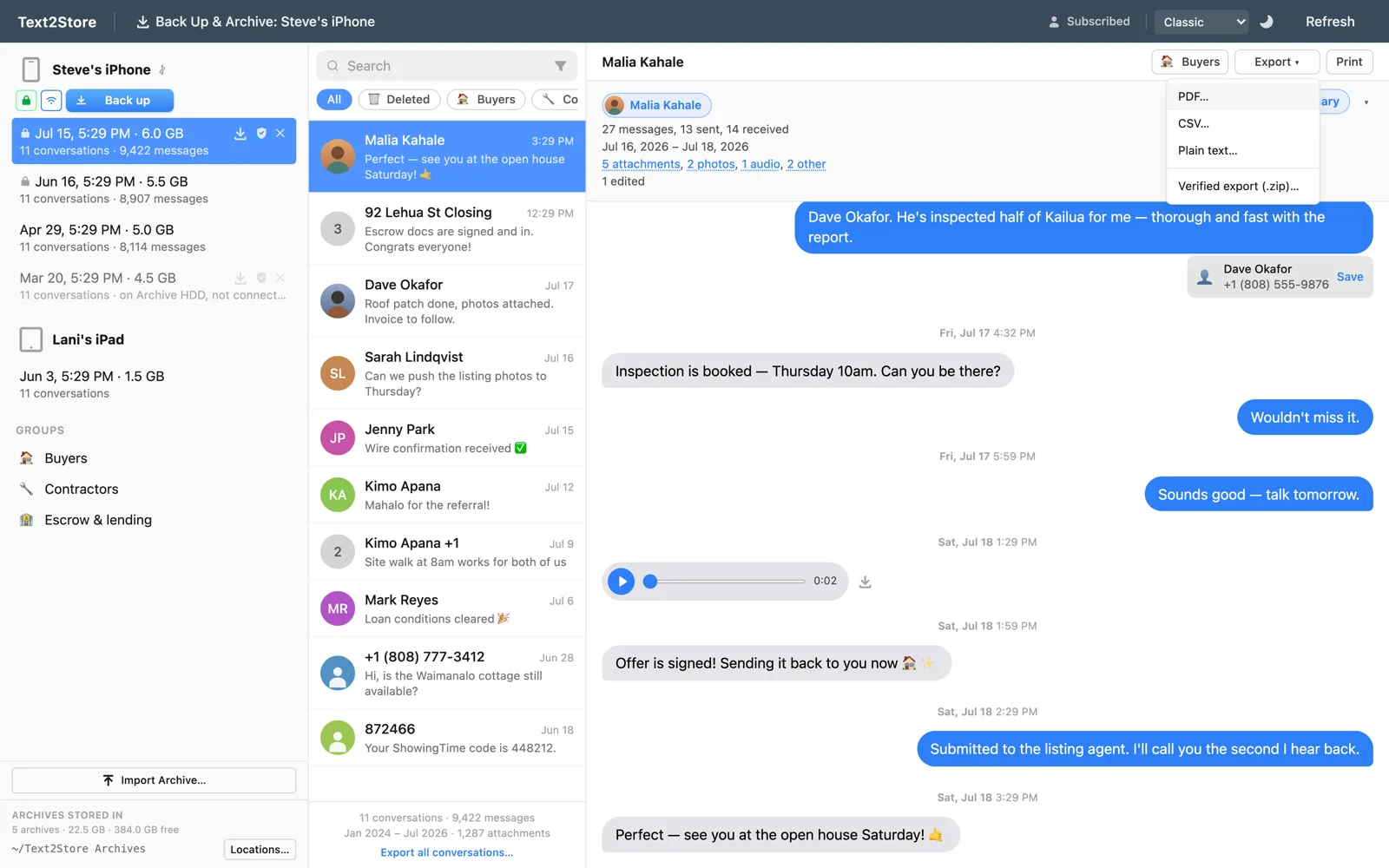
What ends up in the PDF
- Every message in the thread with its date and time, including edited messages marked as edited.
- Photos and attachments, placed inline where they were sent.
- Messages deleted on the iPhone that an older backup still contains, clearly flagged rather than silently mixed in.
- A note when anything was left out, so the document can't quietly misrepresent the record.
When a PDF isn't enough
A PDF is readable, but it can't prove itself. If the copy might need to convince someone skeptical later, Text2Store can also produce a verified export: a package carrying file hashes and an independent DigiCert trusted timestamp, checkable by anyone with standard tools. And for legal review platforms there's RSMF export. Same conversations, sturdier containers.
What it costs
Backing up, browsing, and searching are free. Exporting, PDF included, is part of the subscription: $29.99/year covering every iPhone, iPad, and computer you own.
Common questions
Does the PDF include photos?
Yes, inline where they were sent, along with the poster frame for videos and links for other attachments.
Can I export WhatsApp chats to PDF too?
Yes. WhatsApp conversations come out of the same iPhone backup and export the same way as Apple Messages.
Can I export every conversation at once?
Yes, there's a bulk export that writes every conversation in a backup to a folder of files, PDF included, with an optional date range.
Do I need iTunes?
No. Text2Store makes the backup itself over USB or Wi-Fi.