
Getting a desktop app that talks to iPhones over USB into the Microsoft Store sounds contradictory, and for a while we thought it might be. The Store wants sandboxed, silently-installable, driver-free packages; an iPhone backup app wants a USB daemon. This chapter is how that resolved, the one experiment everything waited behind, a certification rejection over a single word, and the decision at the end that surprised us: killing our own installer.
The decider experiment
Everything hinged on one question we refused to build past until it was answered: can a packaged MSIX app reach Apple's usbmuxd daemon, the process that owns iPhone communication, on localhost? The Store's runFullTrust capability suggested yes; nothing guaranteed it. So the first Windows Store work item was a loose-packaged build on a real machine with a real iPhone. The container detected its packaged identity, spawned our device sidecar, saw the daemon listening on port 27015, and a backup started. The process tree told the whole story: our app, our sidecar, Apple's device process, all cooperating inside the sandbox. Only after that ran did Partner Center get touched.
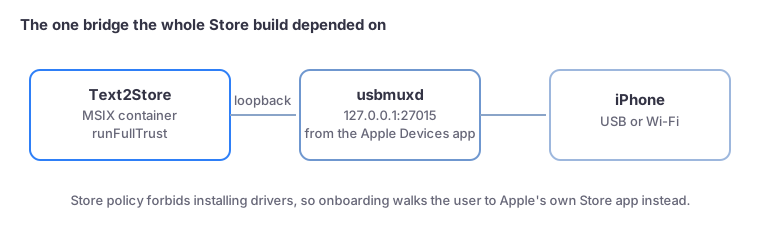
What Store policy takes away, and the cold start it forces
Our website installer used to end with a one-click offer to install Apple's device support. Store policy forbids that: no driver installation, silent installs only. So the Store build detects the missing daemon and walks the user to Apple's own Apple Devices app in the same Store, with one hard-won caveat baked into the onboarding: that app must be opened once before its daemon starts serving, so the walkthrough says so explicitly. The Store flavor also disables self-updating (MSIX packages are immutable; the Store owns updates), detected at runtime via package identity rather than compiled into a separate build.
Rejected over one word
The first certification attempt came back with a single finding: the listing's search keywords included "iMessage", another company's product title, which Store policy 10.1.3 forbids regardless of relevance. Fair enough: fixed the keywords, resubmitted the same day, approved. Two lessons for anyone following: the Partner Center form validating your keywords means nothing (the tool's hints are not the policy), and product names you do not publish belong in your description prose, never your keyword field.
The ending we did not plan: Store-only
The Store was meant to be the second Windows channel beside our signed installer. Then we lived with the installer's realities for a while: Edge and SmartScreen fight every download of a low-reputation indie binary regardless of its valid signature; the Authenticode certificate displays a personal name, because a young LLC cannot get organization validation for years; and code-signing infrastructure bills monthly whether anyone downloads or not. The Store solves all of it: Microsoft signs, Edge trusts, updates are automatic, and the listing names the company. So the direct Windows installer is retired, the website's Windows button is now the Store badge, and the installer machinery survives only as a documented emergency hatch. Sometimes the platform tax is cheaper than independence; it costs a solo developer real discipline to admit that, and real math to prove it.
The app this all ships is in the Microsoft Store; the beginning of this whole story is in chapter one.