
Help
Using AI Summary
AI Summary gives you a quick, plain-language recap of a long conversation. It's included in your Text2Store subscription, with nothing to set up and no API key to manage.
The short version
Open a conversation and click AI Summary. It runs in the cloud via Google Gemini, after you confirm sending that one conversation, and each summary uses one of your monthly credits. Included in your subscription; nothing to set up.
How it works
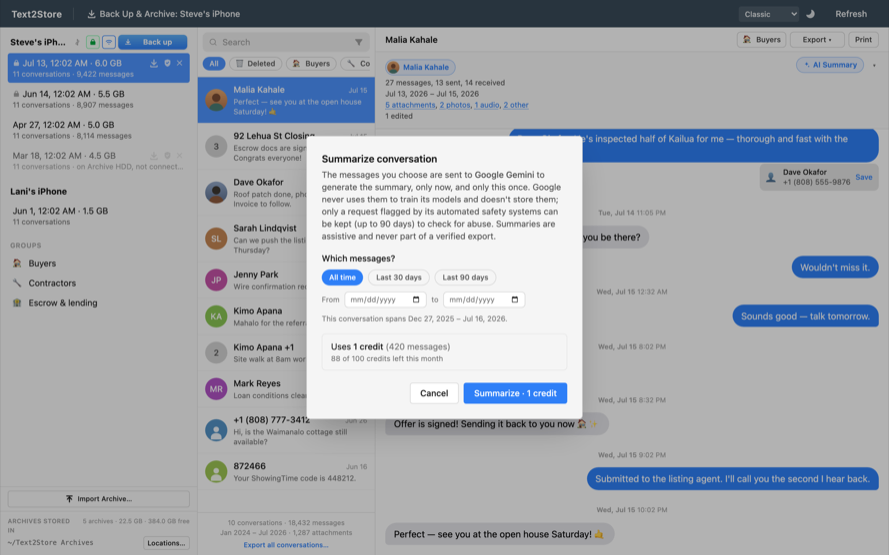
AI Summary is built in. Just click the AI Summary button on any open conversation. The selected conversation is sent to Google Gemini to generate the summary, included in your subscription. You confirm each conversation before it's sent; nothing is ever sent automatically.
Credits
Summaries draw on a monthly allowance of credits that resets on the 1st. A short conversation is one credit; a very long one may use a few. The confirmation dialog shows what a summary will cost and how many credits you have left before you run it.
What's private
- Google Gemini: only the one conversation you explicitly confirm is sent. It passes through our own service, which relays it to Google and does not store or log your message content; it counts usage only. Google does not use it to train its models and does not store it after answering; only a request flagged by Google's automated safety systems can be kept, up to 90 days, for abuse review.
- Summaries are assistive and may be imperfect; they are never part of a verified export.
Finding the settings
Open Settings → AI Summary in the app's menu bar to see your remaining credits.
Troubleshooting
- "AI summaries are part of your Text2Store subscription. Sign in to use them."
- Cloud summaries need an active subscription. Open Settings → Text2Store Subscription and sign in with your purchase email.
- "You're out of AI summary credits for this month."
- You've used this month's allowance. It resets on the 1st.
- "Couldn't reach the AI service."
- Check your internet connection and try again.
Still stuck?
Email hello@text2store.com and we'll help.