
Export iPhone and WhatsApp messages to RSMF
RSMF production used to mean forensic-lab tooling and forensic-lab pricing. If the phone's owner is cooperating, there's a more direct route: back the phone up on an ordinary computer and export review-ready RSMF for $29.99 a year.
The short version
RSMF (Relativity Short Message Format) is how chat data goes into eDiscovery review as a conversation: participants, threading, reactions, receipts, attachments. Text2Store backs up an iPhone over USB or Wi-Fi and exports RSMF directly, per conversation or a whole backup at once, Apple Messages and WhatsApp both. Every change to the writer is tested against Relativity's published validator before it ships.
Who this is for
Small firms, solo practitioners, paralegals, and investigators who are handed a client's phone, with the client's consent, and need the messages in a review platform rather than a stack of screenshots. The typical alternatives are a forensic vendor engagement (priced per phone, scheduled in weeks) or enterprise collection suites (priced for labs). When the collection is consented and the custodian is your own client, neither is required to produce clean RSMF.
What the export preserves
- Participants and senders, resolved to the same names the archive shows.
- Threading: inline replies point at the message they answer.
- Reactions and receipts: tapbacks attached to their message, and for Apple Messages the read and delivery times where the phone recorded them. WhatsApp receipts are not included.
- Attachments, carried inside the package as their original files.
- Deleted-on-device messages the backup still contains, included and marked as deleted, so the reviewer decides relevance. (This deliberately differs from our PDF/CSV exports, which omit them and say so: a review platform is exactly the place for the complete, flagged record.)
- Honest scope. A date-limited production reflects exactly the requested range; a WhatsApp transcript states its scope.
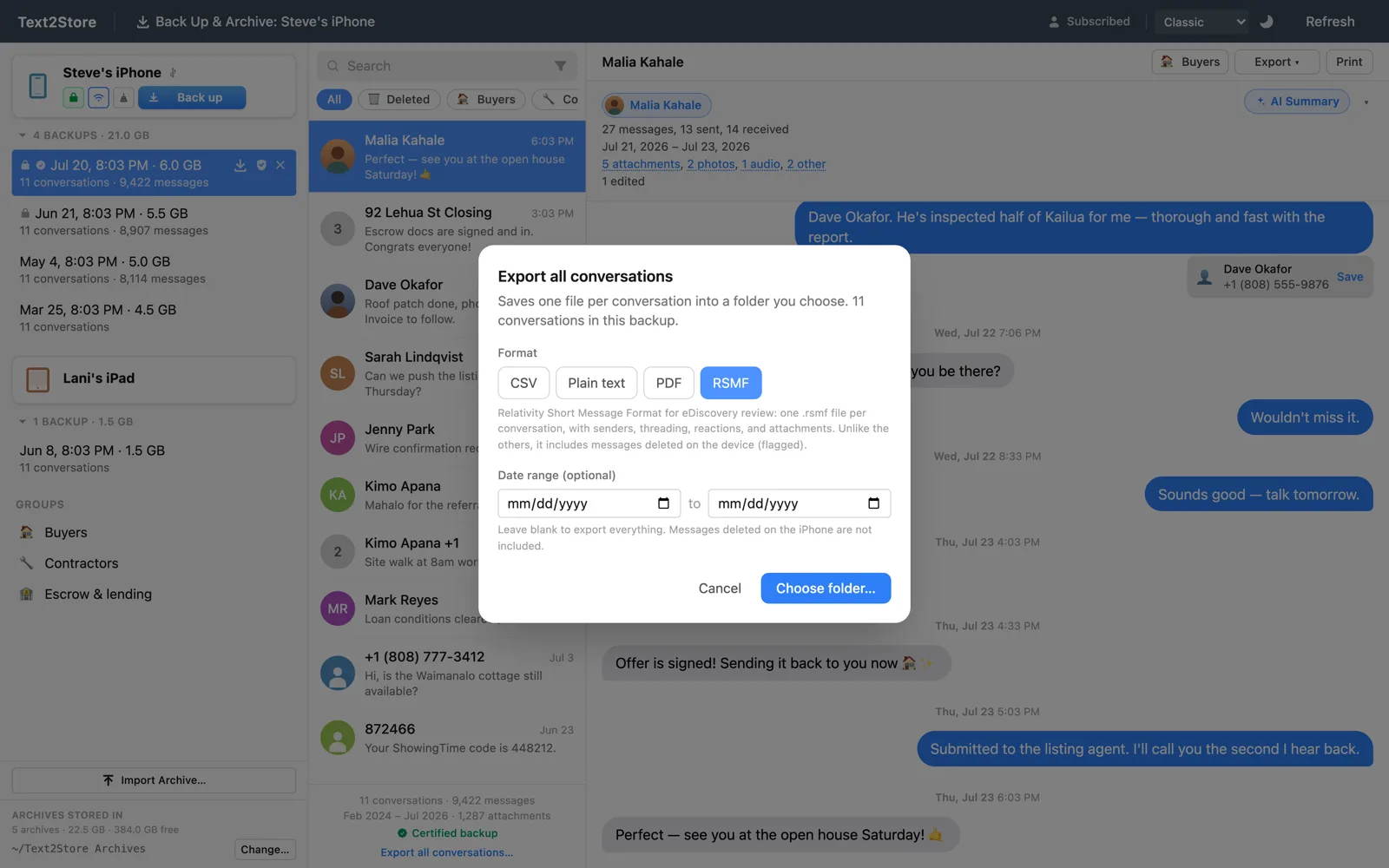
The office workflow
- Back up the phone. Client's iPhone, client's consent, USB cable, tap Trust, click Back Up & Archive. The archive lands on your machine as local files; your messages never go to any cloud.
- Find the conversations that matter. Search across the whole archive is free before subscribing (you see which conversations match; reading everything unlocks with the subscription); group related threads by matter.
- Export. Per conversation: Export > RSMF for eDiscovery review. Whole backup: Export All Conversations…, each conversation becoming its own .rsmf file in a folder named for the device and backup. Date-scope either one.
- Hand off to review. Your vendor or platform ingests the .rsmf files and rebuilds the conversations.
Scale is not a concern: the export engine is tested at 85,000 messages, producing its slices in a few seconds on an ordinary desktop, and a real 84,000-message thread has exported cleanly in the same engine family.
What RSMF is not, and what to pair it with
RSMF is a format for moving conversations into review. It makes no integrity claim about itself, and this page won't pretend otherwise. If the matter also needs an answer to "how do we know this record is unaltered?", pair the production with Text2Store's integrity tools: a certified backup anchors the archive with an independent DigiCert trusted timestamp the moment it's created, and a verified export packages messages with checksums and that timestamp so anyone can verify them with standard tools. Produce the RSMF for the review platform and the verified export for the record; they come from the same archive. (The full comparison lives in the RSMF help page.)
What it costs
$29.99/year, covering every device and computer you use it on: backup, search, PDF, CSV, RSMF, certified backups, and verified exports. There is no per-phone fee, no per-production fee, and no separate eDiscovery tier. Backing up and searching are free before you subscribe, so you can confirm the messages are in the backup before paying anything. See pricing.
Common questions
Do I need Cellebrite or other forensic software to produce RSMF?
No. Text2Store backs up the phone itself and exports RSMF directly on an ordinary Mac or Windows computer. If your matter requires a forensic acquisition or expert testimony about the collection method, that's a scoping question for the case; for owner-consented collections, this is the direct route.
Is the output actually valid RSMF?
Every change to the RSMF writer is tested against Relativity's published validator before it ships. That gate is a standing rule of the development process, not a one-time claim.
Does it include WhatsApp?
Yes. WhatsApp chats contained in the iPhone backup export to RSMF the same way as Apple Messages.
What about deleted messages?
Included when the backup still contains them, and clearly marked as deleted, so the reviewer decides relevance.
Can I limit a production to a date range?
Yes, per conversation or across a bulk export.
Not legal advice
This page is general information, not legal advice. Collection method, scope, and admissibility are case-specific legal questions; when they matter, they belong with counsel, and nothing here substitutes for a defensibility assessment in your jurisdiction.
Questions?
Email hello@text2store.com, we answer quickly. Or download Text2Store and confirm the messages are in the backup for free.