
Every Text2Store archive is a complete, physical copy of a backup. That is a deliberate safety property and a deliberate storage cost, and this chapter is about the collision between the two: the deduplication scheme we built and then killed in a day, the file-system feature that gave us most of the benefit for none of the risk, and the lengths we went to before letting the app print a single storage number it had not verified.
The dedup we refused to ship
Backups of the same phone are mostly identical month to month, so the obvious engineering move is a content-addressed pool: store every attachment once, keyed by hash, and let archives reference it. We built phase one of exactly that. Then we wrote the failure-mode census: what happens to every archive that references the pool when one pooled file goes bad, gets half-written, or is touched by a sync crash. The answer is that corruption stops being local. One damaged file can silently poison every archive that points at it, in a product whose whole promise is "this copy will still be good in ten years." The pool was withdrawn the next day. Full physical copies are not storage waste; they are the isolation boundary. That decision is recorded, and we do not plan to relitigate it.
What we used instead: let the file system do it
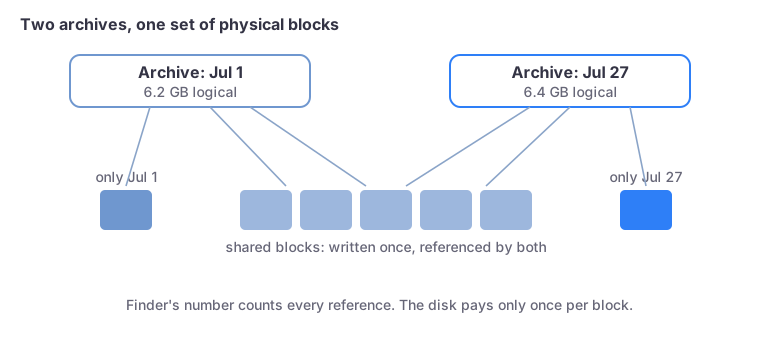
APFS, the Mac's file system, has copy-on-write cloning: clonefile(2) copies a file by making the new file reference the same physical blocks, and only diverging blocks are ever written twice. So archiving works like this: clone the previous archive's files where the backup says they are unchanged, then hash what actually landed to prove the clone is byte-identical to what the manifest claims. A probe during development made the point vividly: cloning 512 MB moved the disk's free-space number by approximately nothing.
The result inherits none of the pool's risk. Every archive is still a complete, independent file set with its own integrity manifest; if the OS ever breaks a clone's sharing, you have two real copies, not one broken reference. The sharing is an optimization the file system owns, not a data structure we maintain. On Windows and on external drives formatted exFAT, where cloning does not exist, the app simply makes real copies and says nothing it cannot back up.
Verifying a thing the OS will not tell you
Here is the awkward part: having built on cloning, how do you display honest storage numbers? Finder reports logical sizes, so two clone-sharing archives "total" 12 GB while the disk only gave up 7. If the app claims savings it has not verified, it is guessing; the demographic we serve does not deserve guesses. There is no public API that answers "do these two files share storage." There is, however, fcntl with F_LOG2PHYS: ask the file system for the physical block address behind a logical offset of a file. If two files return the same physical address for the same content, they demonstrably share it.
We ground-truthed the probe before trusting it: a byte-copied file (real duplicate, made with dd) shows different physical blocks; a cloned file (cp -c) shows the same ones. On a real archive pair, 98.9% of the second archive's bytes were shared. Only after that verification does the UI say "about 7.2 GB on disk", and on any file system where the probe cannot verify sharing, the label simply never appears. The buyer-facing version of this story is on the main blog; the help page on storage covers the practical knobs.
The units postscript
One more honesty bug this area produced: a tester reported our numbers "not matching Finder." They matched byte-for-byte; the units did not. Finder displays decimal gigabytes, Windows Explorer displays binary gibibytes while calling them GB, and we had picked one convention for both platforms. The fix is per-platform units so the app always agrees with the file manager the user is looking at. Nobody is right in that fight; agreeing with the thing next to you is the only honest option.