
How to back up iPhone text messages to a Mac
Whole conversations onto your own Mac, with photos, timestamps, and WhatsApp chats included. A copy that stays put, even after the phone or iCloud deletes them.
A Mac seems to have this covered already: Messages is right there, and a Finder backup saves the whole phone. Neither one is a copy you can rely on. Messages on the Mac mirrors iCloud, so a conversation deleted on the phone disappears from the Mac too, and it cannot export a whole thread. A Finder backup does hold your messages, but you cannot open it, and each new one replaces the last. So the real answer to "how do I keep my texts on my Mac" is to back the iPhone up and read the messages out of that backup. That is what Text2Store does.
One-time setup
- Download Text2Store for Mac. The download page has it. Open the
.dmgand drag Text2Store into Applications. - Check your Mac. It needs an Apple silicon Mac (M1 or later) on macOS 13.3 or later. Nothing else to install: the Mac already knows how to talk to an iPhone.
Back up the messages
- Connect the iPhone with a USB data cable, plugged into the Mac itself rather than a hub or monitor.
- Unlock the phone and tap Trust, then enter its passcode.
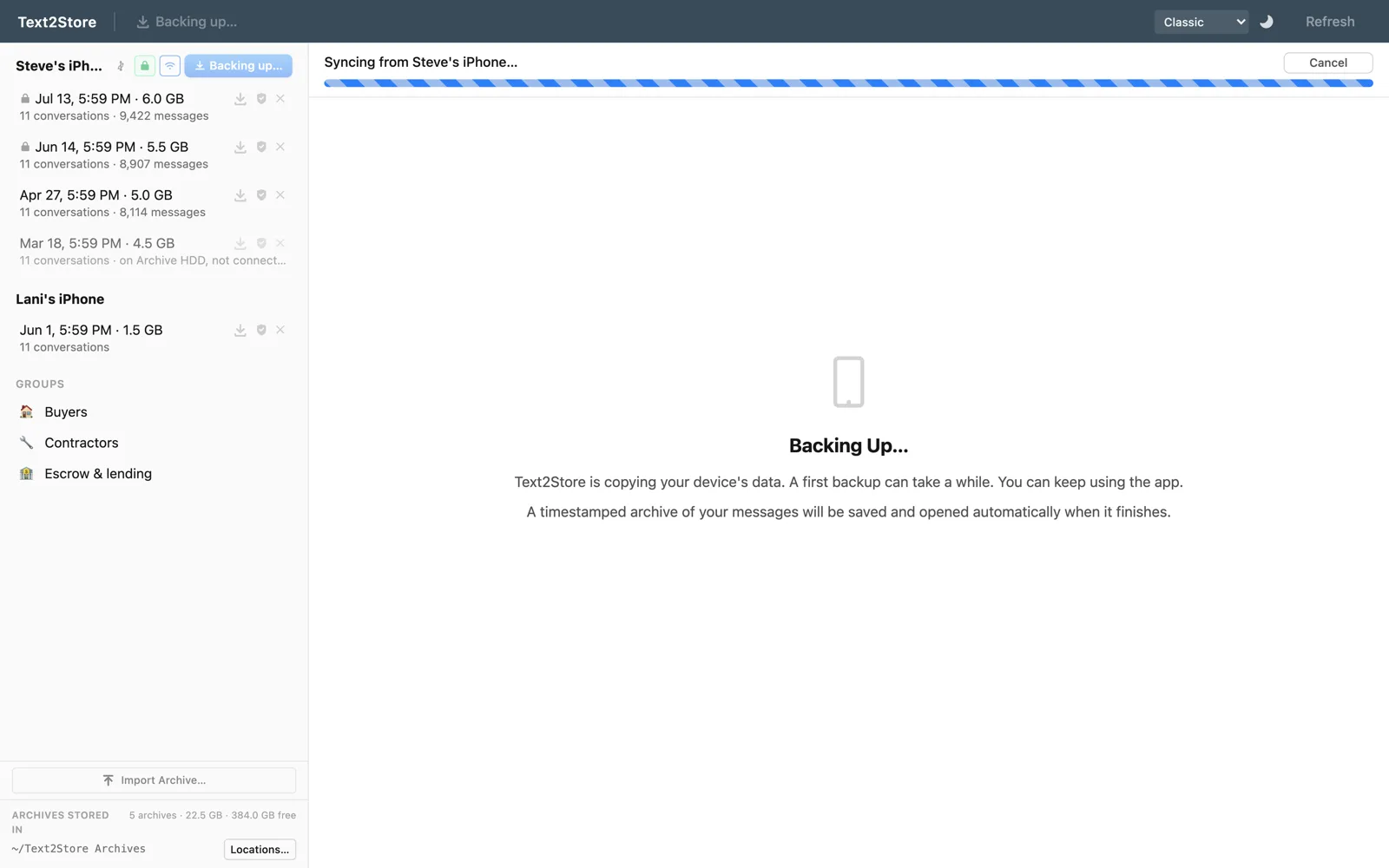
- Click Back Up. The first backup takes a while; every one after it copies only what changed, and later backups can run over Wi-Fi.
- Open the backup. Your conversations appear like a messages app, with photos, voice notes, and reactions in place, and WhatsApp chats in their own tab.
If the phone does not show up, it is nearly always the cable, the port, or the Trust prompt. The device-not-detected checklist covers each one in order. The getting started guide walks through the whole first run.
What you can do with them on the Mac
- Search every message across every backup, as you type. Free.
- Read whole conversations, however long, with photos and attachments where they were sent.
- Export any conversation as a PDF, CSV, or plain text, or print it. Bulk export writes every conversation to a folder at once.
- Keep WhatsApp too. WhatsApp chats come out of the same iPhone backup, with no second app.
Why not just use Messages on the Mac?
Messages in iCloud keeps your texts in sync across your Apple devices. That is useful day to day, but it means the Mac only ever has what iCloud has: a deletion on one device deletes everywhere. Messages also has no way to export a conversation, and File > Print prints only what is currently scrolled into the window, so a long thread does not come out whole. iCloud message backup, and what it doesn't do goes into the difference.
Why not a Finder backup?
A Finder backup is a restore point for the phone, not something you can open and read. Each one replaces the one before, so whatever the phone deleted since last time is gone from the backup too. Text2Store keeps every backup as its own dated archive and merges them into one history, so a thread deleted from the phone months ago is still on your Mac as long as an earlier backup caught it. More on that in backup vs archive.
Encrypted backups
If the iPhone is set to make encrypted backups, Text2Store works with that: you enter the backup password and it reads everything as normal. Encrypted backups also include data a plain one leaves out. The encrypted backups guide explains when to turn it on and what happens if you forget the password.
What's free
Backing up, browsing, and searching your whole history are free and stay free, with no time limit. Every conversation shows its 3 most recent messages, and you can export those, so you can confirm it works on your own phone before paying. Reading and exporting whole conversations is a $29.99 one-time purchase that covers every iPhone, iPad, and computer you own. No subscription.
Common questions
How do I back up my iPhone text messages to my Mac?
Download Text2Store, open the .dmg and drag it into Applications, then connect the iPhone by USB, tap Trust, and click Back Up. The messages land on your Mac as a backup you can read, search, and export.
My Mac already has Messages. Why would I need this?
Messages on a Mac shows what is synced through iCloud right now. Delete a conversation on the phone and it disappears from the Mac too, and Messages cannot export a whole thread. A backup keeps its own copy that stays put, with photos and timestamps, and lets you export it.
Does a Finder backup keep my messages?
It holds them, but you cannot open or read it, and each new Finder backup replaces the last one, so anything deleted from the phone since then is gone from it too. Text2Store keeps every backup as its own dated copy.
Which Macs does it work on?
Apple silicon Macs (M1 or later) running macOS 13.3 or later. It works best with at least 8 GB of memory.
Can I move WhatsApp chats to my Mac the same way?
Yes. WhatsApp chats are inside the same iPhone backup, so they come across with your texts and appear in their own tab, with the same search and exports.
Why isn't my iPhone showing up on my Mac?
Usually a charge-only cable, a hub or monitor port, or a missed Trust prompt. The device-not-detected checklist on the help page goes through each fix in order.
Start with one backup
Get Text2Store for Mac and back the phone up; that part is free, and it is the step everything else depends on. Questions go to hello@text2store.com. On a Windows PC instead? See backing up iPhone text messages to a Windows PC.