
Print iPhone text messages
A whole conversation on paper, with the date and time on every message and photos where they were sent. Any length of thread, from a short exchange to years of messages, on Mac and Windows.
There is no print button in Messages on an iPhone. No print command, no AirPrint for a conversation, nothing in the share sheet that produces a page. People usually discover this after a few minutes of looking, then fall back to screenshots, which is fine for three messages and hopeless for three hundred.
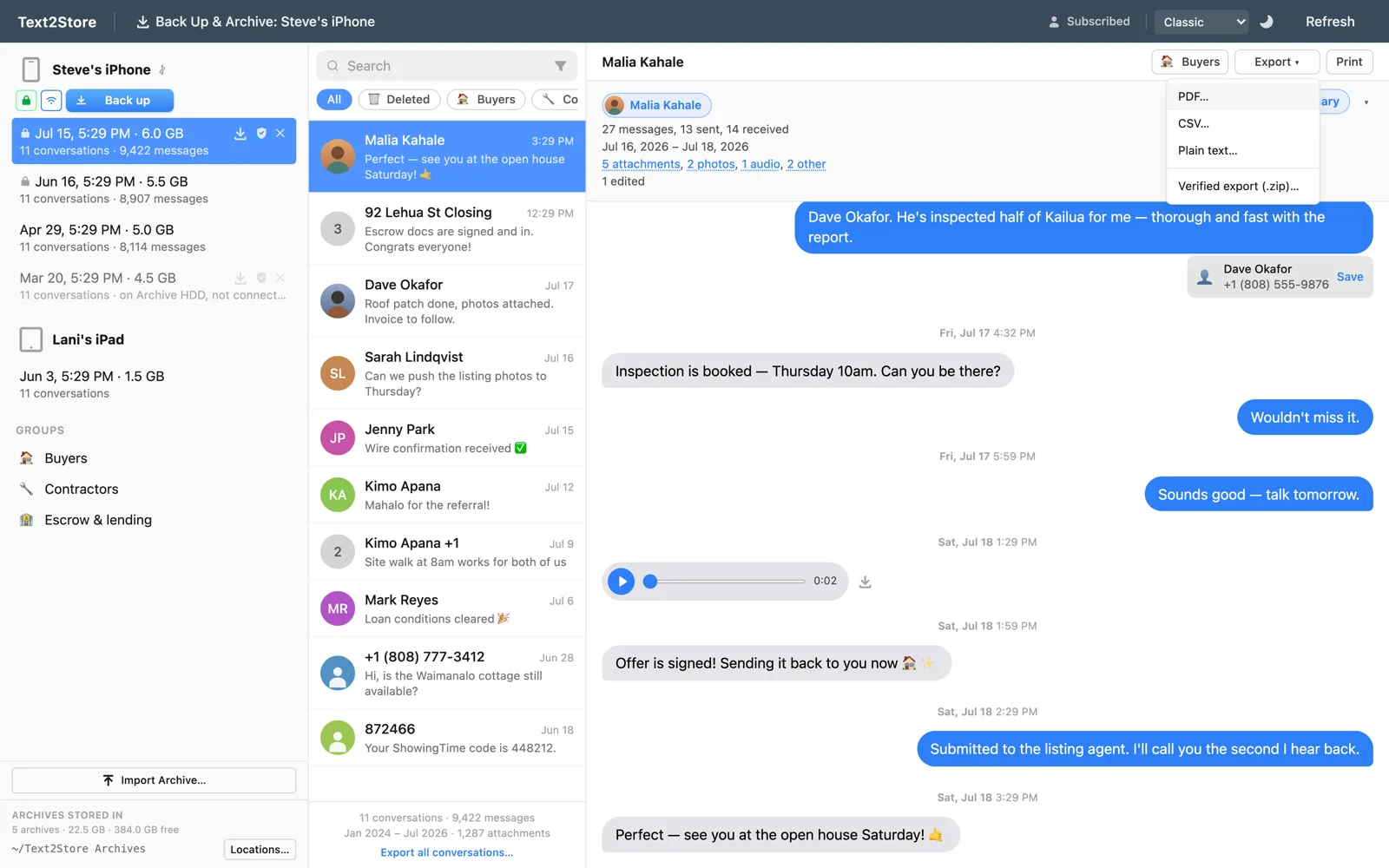
The route that works is the same one behind every other way of getting messages off a phone: back the iPhone up to a computer, then print the conversation from there. Text2Store does the backup itself, shows the thread the way the phone does, and sends it to your printer with everything intact.
The steps
- Install Text2Store. Get it here for Mac or Windows. Backing up and browsing are free.
- Back up the iPhone. Connect with a USB cable, tap Trust on the phone, click Back Up.
- Open the conversation you want on paper.
- Choose Export, then Print, or export to PDF first and print from that. For anything long, the PDF route is the reliable one, for the reason below.
What the printout looks like
- A date and time on every message, not just on the day dividers. Group threads carry each sender's name, and one-to-one threads are laid out sent versus received the way the phone shows them.
- Photos inline, printed where they were sent. Videos and other attachments appear as labeled entries with their file name and size, since a video cannot go on paper.
- A header that says what this is: which conversation it came from, and the date of the backup it was printed from.
- Clean pagination, so a message is not cut in half across a page break.
Why long threads need the PDF route
Print dialogs, whether in a browser or an app, render a document in a single pass, and that pass has limits. Push a conversation with tens of thousands of messages through one and it stalls or gives up. Text2Store handles this by exporting long threads to PDF in parts and merging them into one document automatically, each part labeled by its message range. You then print from that PDF, all of it or only the pages you want. A real thread past 80,000 messages has come through this way intact.
For a short conversation none of this matters and you can print directly. The app routes you to the PDF when the thread is long enough to need it, rather than letting the print dialog fail.
Printing only part of a conversation
Two ways, depending on what you know. If you know the dates, set a date range before exporting and only those messages come out. If you would rather see it first, export the whole thread to PDF, find what you need, and print just those pages from your PDF reader. The second is usually easier when you are looking for something and not sure exactly when it happened, and search will help you find it.
A note on paper copies
A printout is a readable copy, and it is worth knowing what it is not: paper carries no way to show whether it was altered before printing. If the copy needs to stand up to that kind of question, a certified backup and verified export add an independent timestamp and per-file checksums, so anyone can confirm with standard tools that the files have not changed since they were made. Print from that and you have both the readable copy and the checkable one.
Common questions
Can I print text messages directly from my iPhone?
No. Messages has no print command and AirPrint is not offered for a conversation. Backing up to a computer and printing from there is the workable route.
Does every printed message show its date and time?
Yes, on every message, with sender names in group threads and the source conversation stated on the document.
Can I print a conversation with thousands of messages?
Yes. Long threads export to PDF in parts, merge automatically, and print from there, which avoids the single-pass limits that make print dialogs fail.
Do photos print with the messages?
Yes, inline where they were sent. Other attachments print as labeled entries with their file name and size.
Can I print just part of a conversation?
Yes, either with a date range before exporting or by printing selected pages from the PDF.
Does it work on Windows?
Yes, on Windows and macOS both. On Windows especially, since Apple's Messages app does not exist there and offers no path at all.
Try it on one conversation
Download Text2Store and back the phone up; that part is free. Exporting and printing whole conversations needs the $29.99 one-time purchase, which covers every device and computer you own. There is a longer walkthrough in printing a whole iMessage thread, and the PDF path is covered on exporting to PDF.