
Using AI Summary
AI Summary gives you a quick, plain-language recap of a long conversation. It runs on AI credits that come with your purchase, with nothing to set up and no API key to manage.
The short version
Open a conversation and click AI Summary. It runs in the cloud via Google Gemini, after you confirm sending that one conversation, and each summary uses one of your AI credits. 25 come with your purchase, and more are available in packs; nothing to set up.
How it works
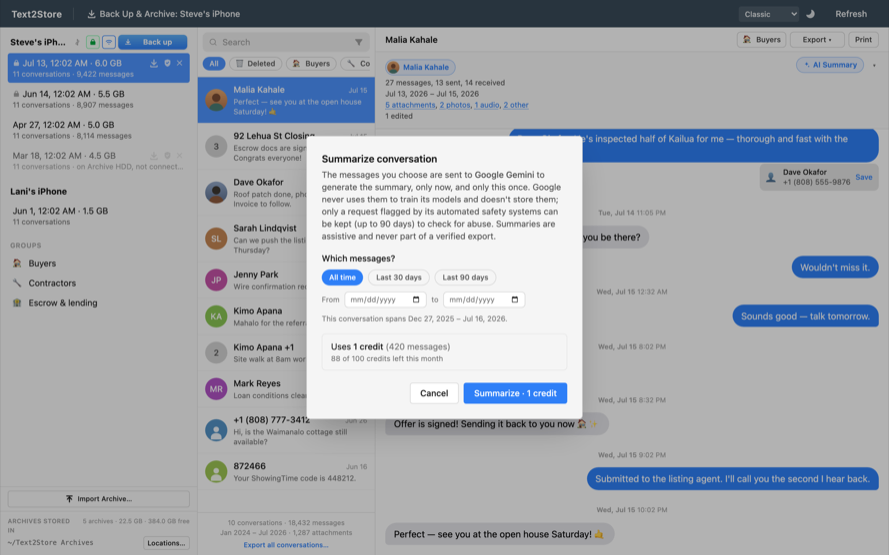
AI Summary is built in. Just click the AI Summary button on any open conversation. The selected conversation is sent to Google Gemini to generate the summary, paid for with your AI credits. You confirm each conversation before it's sent; nothing is ever sent automatically.
Credits
Summaries draw on your AI credits. 25 come with your purchase, they never expire, and more are available in packs of 50 for $4.99. A short conversation is one credit; a very long one may use a few. The confirmation dialog shows what a summary will cost and how many credits you have left before you run it.
What's private
Text2Store
Reads your backup and shows the summary when it comes back. We never keep a copy of the summary.
Never leaves this computer
- Your iPhone backups
- Every other conversation, and all attachments
- Your archives and verified exports
Text2Store's service
Relays the request to Google. Doesn't store or log your message content; counts usage only.
Google Gemini
Writes the summary. Never trains on your messages and doesn't store them at all.
- Google Gemini: only the one conversation you explicitly confirm is sent. It passes through our own service, which relays it to Google and does not store or log your message content; it counts usage only. Google does not use it to train its models and does not store it after answering.
- Summaries are assistive and may be imperfect; they are never part of a verified export.
Finding the settings
Open Settings → AI Summary in the app's menu bar to see your remaining credits.
Troubleshooting
- "AI summaries need a Text2Store license. Sign in to use them."
- Cloud summaries need a Text2Store license. Click Free plan · Sign in in the top-right corner and sign in with your purchase email.
- "You're out of AI credits."
- Your balance is empty. Buy more from Settings, then AI Summary, or at text2store.com/credits. Credits you buy never expire.
- "Couldn't reach the AI service."
- Check your internet connection and try again.
Related
Ask Your Messages, searching every message, and buying more AI credits.
Still stuck?
Email hello@text2store.com and we'll help.