
Ask Your Messages
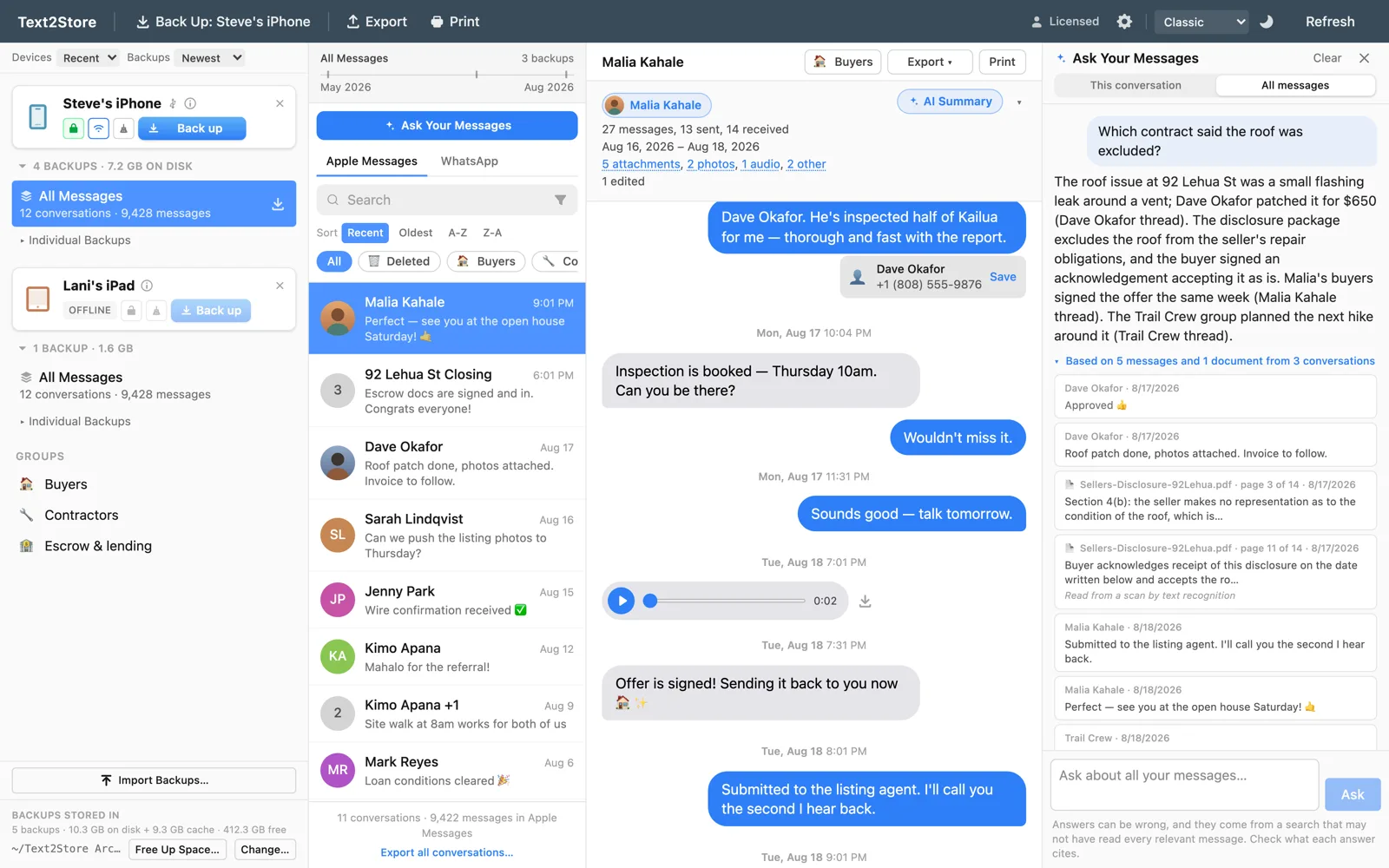
Search finds the words you remember. Ask Your Messages finds the facts you remember: type a question in plain words, and Text2Store answers it from your own archive, showing every message and document the answer relied on.
The short version
Click Ask Your Messages, turn it on once, and ask things like "what did the contractor quote for the roof?" Your messages are indexed on your computer, so indexing sends nothing. Asking a question sends only the question and the few messages chosen to answer it. Each answer cites what it used, and each question uses one AI credit.
Turning it on
- Open an archive and click Ask Your Messages. The pane opens beside your conversations.
- Read the consent screen and choose Turn on Ask Your Messages. It explains what stays on your computer and what is sent when you ask. You agree once per archive.
- Let it set up. The first time, the app downloads its on-device language model (about 220 MB, once) and then builds the index for that archive. This runs on your computer. A large archive can take a while the first time.
After new backups, the pane offers Index new messages so later messages get included too.
Asking good questions
- Ask about facts, not words. "Who paid the deposit?" works even if nobody used the word "deposit". If you remember the exact words, ordinary search is faster and free.
- Choose the scope. This conversation asks about the open thread. All messages asks across your whole archive, including WhatsApp chats and messages later deleted from the phone that an older backup kept.
- Follow up naturally. "And what did she say about the date?" keeps the context of your previous question.
- Check the citations. Under every answer is a line like "Based on 5 messages and 1 document from 3 conversations". Open it and click any row to go to that exact message.
It reads attachments too
Answers can come from the documents in your conversations, not just the messages. PDFs are read page by page, and scans, screenshots and photos of paper are read with text recognition. A citation from a document names the file and page (for example, Lease.pdf, page 3 of 14) and says whether the words came from the file's own text or were recognised from an image, so you know how far to trust them.
What stays on your computer
- The index is built locally, by a model that runs on your computer. Building it sends nothing, and it works with the network off once the model is downloaded. Next to an encrypted backup, the index is encrypted too.
- Asking sends only what the answer needs: your question, your last few questions for context, and the message excerpts picked to answer it. They go through Text2Store's service to Google's AI to write the answer. Neither stores your messages, and Google does not train on them.
- Your questions and answers are saved on this computer, so you can come back to them. Settings can clear that history, and deleting the index turns the feature off.
The privacy policy has the full details.
Credits and what you need
Ask Your Messages comes with the $29.99 purchase. Each question uses one AI credit, the same credits AI Summary uses. 25 come with your purchase, they never expire, and more are available in packs of 50 for $4.99. Building the index is included for normal use.
Text2Store works best on a computer with at least 8 GB of RAM, and building the index is where you'll notice it most.
When an answer can be wrong
Answers are written by AI and can be wrong, which is why every answer shows its sources. Ask Your Messages also tells you what it couldn't see. If the index hasn't caught up with your latest backups, the answer says how far it has indexed. If there is no index yet, the answer says it only looked at recent messages. If the AI service can't be reached, Ask says so, and ordinary search keeps working. Answers are for finding and understanding your messages. They are never part of a verified export.
Troubleshooting
- The answer says it couldn't find anything, but I know it's there.
- Check that the index is up to date (the pane offers Index new messages if it isn't), switch the scope to All messages, and try naming the person or roughly when it happened.
- "You're out of AI credits."
- Buy more from Settings or at text2store.com/credits. Credits never expire.
- "Couldn't reach the AI service."
- Check your internet connection and try again. Search doesn't depend on it and keeps working.
- Indexing is slow.
- The first index of a large archive takes the longest; later updates only add new messages. Closing other heavy apps helps, and Text2Store works best with at least 8 GB of RAM.
Related
Searching every message, AI Summary, the Ask Your Messages announcement, and how it works under the hood.
Still stuck?
Email hello@text2store.com and we'll help.