
Search works when you remember the words. You type inspection, you get the messages that say inspection. But most of what you actually want back from years of messages isn't a word, it's a fact: did we ever settle who paid the deposit? What did the contractor quote for the roof? Which contract said the roof was excluded? You remember the answer exists. You don't remember how anyone phrased it, which thread it was in, or whether it was even a message at all rather than a page of some PDF somebody attached.
Text2Store has a feature for exactly that moment. It's called Ask Your Messages: type a question in plain words, and the app answers it from your own archive.
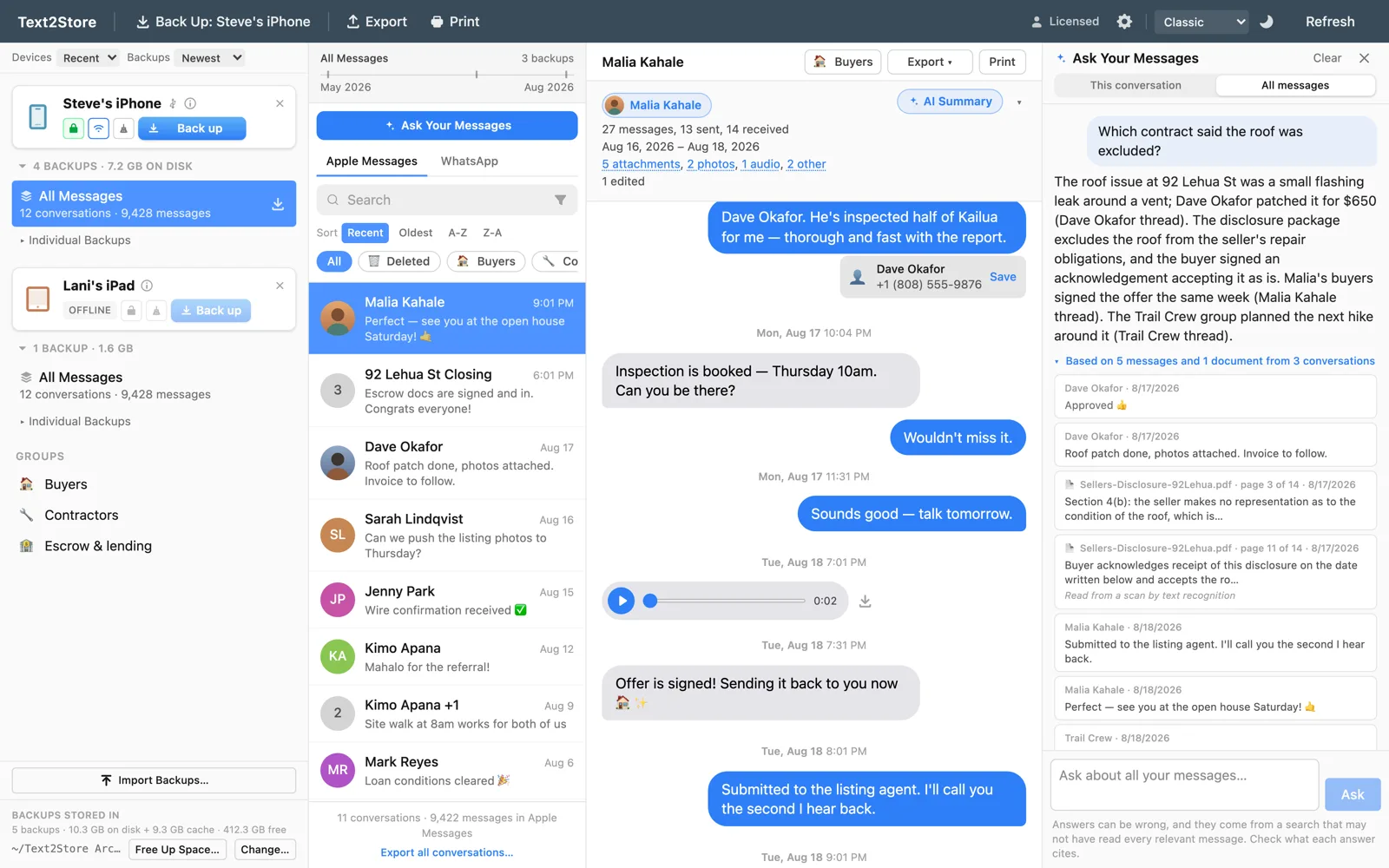
Answers with receipts
Anyone who has used an AI chatbot knows the uneasy feeling: the answer is fluent, confident, and possibly wrong. We didn't want to ship that feeling into an app that people trust with a decade of their history, so every answer comes with its receipts. Under each one there's a line like "Based on 5 messages and 1 document from 3 conversations", and opening it shows exactly which messages the answer stands on. Click one and you jump to that message in the real thread, the same way a search hit does. You never have to take the answer's word for it; checking is one click.
That line is also honest in the other direction. If the app couldn't reach the AI service, it says so. If your index only covers part of the archive, the answer says what it could see. And every answer carries a standing reminder that answers can be wrong and which messages to check. An answer you can verify beats an answer that sounds nice.
It reads the paperwork too
Conversations aren't just bubbles. The lease is a PDF someone attached. The quote is a photo of a piece of paper. So Ask also reads the documents inside your archive: PDFs page by page, and scans and screenshots through text recognition. When an answer leans on one, the citation names the file and the page, like Sellers-Disclosure.pdf, page 3 of 14, and tells you whether those words were read from the file's own text or recognised from a picture of it, so you know how much to trust the transcription.
It sees everything you've kept
Ask runs over the same merged history the rest of Text2Store uses: every backup you've ever made, stitched into one timeline. That includes your WhatsApp chats alongside your texts, and messages you deleted from the phone years ago that an old backup caught. You can scope a question to the open conversation or, the default, ask across everything at once. An answer will happily draw on a text from 2021, a group chat, and a PDF from last month in the same breath.
What leaves your computer, and what never does
This is the part we're proudest of, and it's simple to state: building the index sends nothing anywhere. The semantic index that finds candidate messages is computed entirely on your computer, by a model that runs on your computer. The model itself arrives as a one-time download of about 220 MB when you first turn the feature on; it isn't baked into the installer, so the app stays small for everyone who doesn't use it. Once it's on your machine, you can index a ten-year archive on a plane. Beside an encrypted backup, the index is encrypted too.
Only asking a question sends anything: the question and the handful of message excerpts it retrieved go through our relay to Google Gemini to compose the answer. The relay stores nothing and doesn't log message content, and Google's zero-retention terms for our project mean your content isn't stored there or used to train models. You consent once per archive before the first question, in a dialog that says all of this in plain words, and there's an off switch in Settings that also deletes the index. The privacy policy has the full accounting.
The practical details
Ask Your Messages comes with the Text2Store purchase, and the Ask Your Messages guide walks through setting it up. Questions use AI credits, the same credits summaries use: your licence includes 25, and more are available in packs. Indexing is included. Like every AI feature in Text2Store, Ask is assistive only: it's a way to find and understand what you kept, and it is never part of any verified export.
If you're curious how it works under the hood, including why we built a cloud indexing pipeline and then deleted it in favour of running the model locally, the engineering story is in the developer notes: An answer you can check.